WhatsApp Alerts: Business vs Personal Number — आपको कौन सा इस्तेमाल करना चाहिए?
WhatsApp पर automated alerts receive करना Business और Personal दोनों numbers पर काम करता है। यहाँ देखिए कि हर एक delivery, read receipts, और quiet hours को कैसे handle करता है।
 द्वारा Nacho Coll
Nacho founded WallaWhats so you get the alerts that matter without depending on X's algorithm to surface them — pick the accounts you care about and get a WhatsApp for every post the moment it goes live, in order, nothing throttled or buried.
जब आप X (Twitter) से WhatsApp पर real-time alerts set up करते हैं, तो सबसे common question जो हमें सुनने को मिलती है वो है: “मुझे अपना personal WhatsApp number इस्तेमाल करना चाहिए या WhatsApp Business account बनाना चाहिए?” Answer तुरंत clear नहीं है, खासकर जब दोनों options automated notifications receive करने के लिए perfectly काम करते हैं।
चाहे आप एक financial analyst हैं जो market-moving tweets track कर रहे हैं, journalist हैं breaking news sources monitor कर रहे हैं, या startup founder हैं competitor announcements पर नज़र रख रहे हैं — WhatsApp personal और Business accounts के बीच choice आपके alerts receive करने और manage करने के तरीके को impact कर सकती है। आइए key differences को समझते हैं और आपको right decision लेने में help करते हैं।
WhatsApp Alert Delivery Actually कैसे काम करती है
Comparison में dive करने से पहले, ये समझना important है कि WallaWhats alerts को WhatsApp के standard messaging interface के through deliver करता है—बिल्कुल वैसे ही जैसे आप किसी भी contact से message receive करते हैं। इसका मतलब है कि हमारे alerts basic delivery perspective से personal WhatsApp accounts और WhatsApp Business accounts दोनों पर identically काम करते हैं।
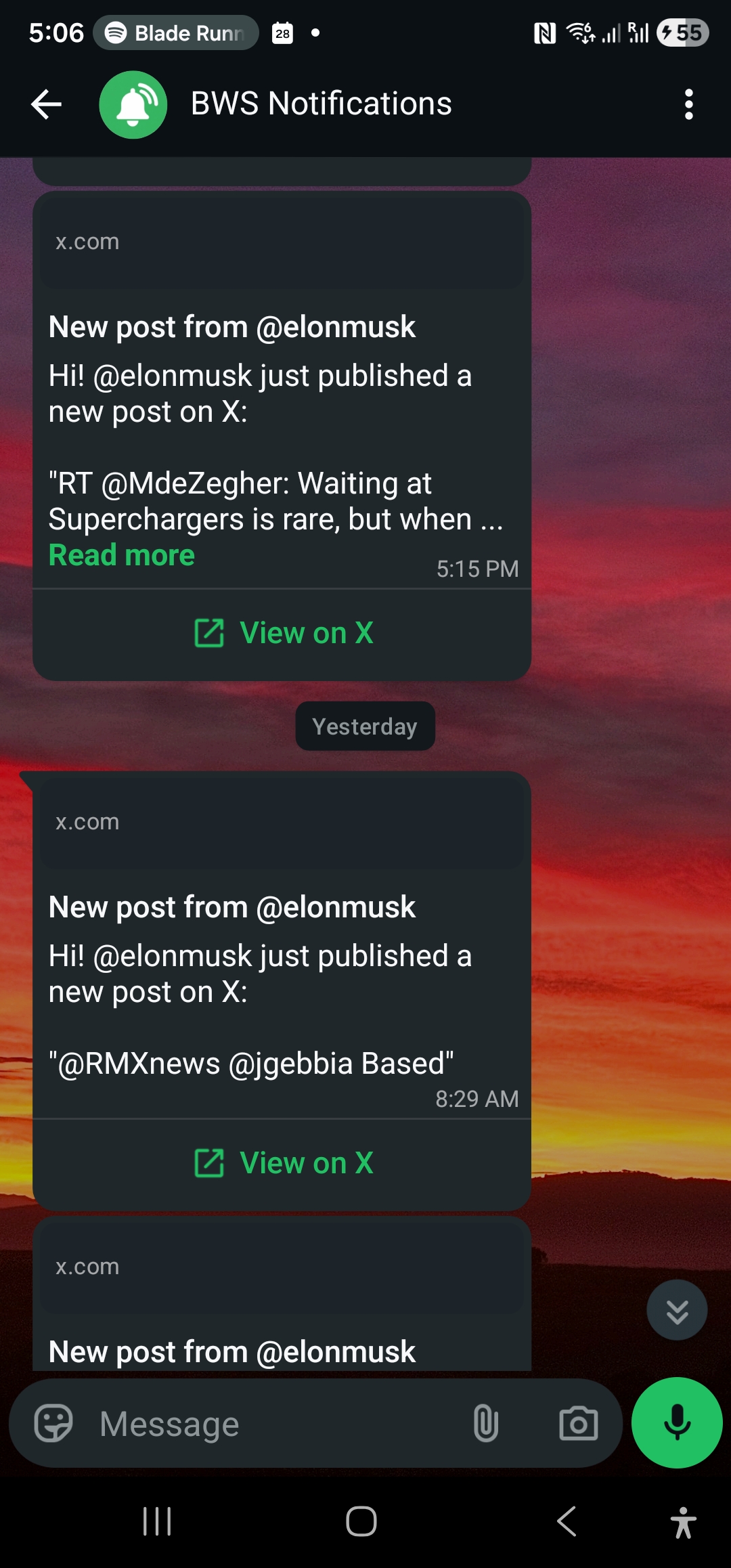
जब आप हमारे channels verification process के through अपना WhatsApp number WallaWhats में add करते हैं, तो आपको one-time verification code मिलेगा। Verify होने के बाद, आपके monitored X accounts से alerts regular WhatsApp messages की तरह आते हैं, जिसमें X handle, post content, timestamp, और original tweet का direct link होता है।
Core functionality—जब आपके followed accounts post करें तो near real-time notifications receive करना—बिल्कुल same रहती है चाहे आप कोई भी WhatsApp account type इस्तेमाल करें।
WhatsApp Personal Numbers: Simple Choice
Most individual users के लिए, personal WhatsApp number alerts receive करने के लिए straightforward choice है। यहाँ reasons हैं:
Immediate Setup
आपका personal WhatsApp number पहले से ही active और आपके phone के साथ verify है। इसे WallaWhats में add करने में सिर्फ कुछ minutes लगते हैं—additional business profiles create करने या WhatsApp Business platform के साथ new numbers verify करने की कोई जरूरत नहीं।
Read Receipt Visibility
यहाँ personal accounts का alert tracking के लिए slight edge है। जब आप अपने personal WhatsApp पर alert read करते हैं, और आपके privacy settings में read receipts enable हैं, तो WallaWhats track कर सकता है कि notification आप तक successfully पहुँची।
हमारा notification history हर alert के लिए delivery status show करता है: queued, sent, delivered, और read। “Read” status तब fire होता है जब WhatsApp confirm करता है कि आपने message open किया है, जो typically personal accounts के साथ more reliably होता है।
No Business Verification Requirements
WhatsApp Business accounts अक्सर additional verification steps require करते हैं, especially अगर आप WhatsApp Business API use कर रहे हैं या verified business badges चाहते हैं। Personal accounts इस सब को completely skip करते हैं।
Privacy और Quiet Hours
Personal WhatsApp accounts आपको WhatsApp की built-in quiet hours feature के through notification timing पर full control देते हैं। आप meetings, sleep, या focus time के दौरान alerts को silence कर सकते हैं without affecting how WallaWhats delivers them—messages still arrive होते हैं, लेकिन आपका phone buzz नहीं करेगा।
WhatsApp Business: जब Teams को Access चाहिए
WhatsApp Business accounts specific scenarios में more sense बनाते हैं, particularly teams और organizations के लिए जिन्हें critical alerts तक shared access चाहिए।
Multiple Device Access
WhatsApp Business WhatsApp Business web client और desktop apps के through multiple devices पर simultaneously run कर सकता है। इसका मतलब है आपकी entire trading desk, newsroom, या startup team same set of alerts monitor कर सकती है without everyone को अपने personal numbers WallaWhats account में add करने की जरूरत।
Professional Separation
अगर आप पहले से ही customer communication के लिए WhatsApp Business इस्तेमाल कर रहे हैं, तो alerts को personal messages से separate रखना cleaner organization create करता है। CEOs से market-moving tweets family photos और friend conversations के साथ mix नहीं होते।
Business Hours और Away Messages
WhatsApp Business accounts business hours और automatic away messages set कर सकते हैं। While यह WallaWhats की alert delivery को affect नहीं करता (हमारी notifications conversations नहीं हैं), यह clients या colleagues को signal करने में help कर सकता है कि आप कब monitor कर रहे हैं vs. offline हैं।
Team Handoff Capabilities
Multiple shifts या on-call rotations वाली organizations के लिए, Business account को team members के बीच personal numbers से more easily transfer किया जा सकता है। Same WallaWhats alert stream staff changes के बावजूद भी uninterrupted continue रहती है।
Read Receipts: Key Technical Difference
Alert purposes के लिए personal और Business accounts के बीच most significant differences में से एक है read receipts कैसे काम करती हैं।
Personal Account Read Receipts
Personal WhatsApp accounts पर, read receipts (blue checkmarks जो आप किसी के आपका message read करने के बाद देखते हैं) bidirectionally काम करती हैं। जब आप WallaWhats alert read करते हैं, और आपकी privacy settings read receipts allow करती हैं, तो हमारा system confirmation receive करता है कि आपने notification देखी है।
यह audit trails के लिए valuable है, especially financial या journalism contexts में जहाँ prove करना कि आपको specific time पर market-moving alert मिली थी legally important हो सकता है।
Business Account Read Receipt Limitations
WhatsApp Business accounts में more complex read receipt behavior है, particularly जब multiple devices connected हैं या Business API use कर रहे हैं। Read status उतनी reliably propagate नहीं हो सकती, जिसका मतलब है हमारी notification history alerts को “delivered” show कर सकती है लेकिन “read” नहीं even जब आपने उन्हें देखा हो।
Most users के लिए, यह difference cosmetic है—आपको alerts either way मिल रहे हैं। लेकिन अगर आपको compliance या documentation purposes के लिए precise delivery confirmation चाहिए, तो personal accounts cleaner tracking provide करते हैं।
API Access और Team Integration
Personal और Business दोनों WhatsApp numbers WallaWhats API के साथ identically काम करते हैं। चाहे आप custom integrations build कर रहे हैं या subscriptions manage करने के लिए हमारे programmatic endpoints use कर रहे हैं, API दोनों account types को same way treat करता है।
यहाँ है कि आप हमारे API के via WhatsApp channel (personal या Business) कैसे add करेंगे:
curl -X POST https://api.wallawhats.com/channels \
  -H "x-api-key: your-api-key" \
  -H "Content-Type: application/json" \
  -d '{"type": "whatsapp", "destination": "+1234567890"}'
Verification process—WhatsApp via one-time code receive करना और dashboard में confirm करना—दोनों account types के लिए identically काम करता है। Verify होने के बाद, alerts आपके सभी enabled channels को fan out होती हैं regardless of whether वे personal या Business numbers हैं।
Automated trading systems या newsroom dashboards build करने वाली teams के लिए जिन्हें programmatically alert subscriptions manage करने की जरूरत है, यह consistency means है कि आप अपना integration once design कर सकते हैं और code changes के बिना दोनों account types को support कर सकते हैं।
Cost Considerations
Personal WhatsApp accounts हमेशा free हैं। WhatsApp Business accounts भी basic messaging functionality के लिए free हैं, लेकिन कुछ advanced Business features (जैसे high-volume messaging के लिए WhatsApp Business API) costs carry करते हैं।
चूंकि WallaWhats आपको inbound notifications भेजता है rather than आप outbound messages भेजते हैं, दोनों account types हमारे use case के लिए free रहते हैं। आप alerts receive करने से कोई WhatsApp Business messaging limits या charges नहीं hit करेंगे।
हालांकि, अगर आप पहले से ही customer communication के लिए WhatsApp Business API access के लिए pay कर रहे हैं, तो WallaWhats alerts के लिए same Business number use करना आपके communication channels को consolidate करने के लिए sense बनाता है।
Quiet Hours और Do Not Disturb
Personal और Business दोनों WhatsApp accounts notification scheduling support करते हैं, लेकिन वे इसे differently handle करते हैं:
Personal Account Quiet Hours
Personal WhatsApp में simple “Notifications” setting है जहाँ आप specified hours के दौरान सभी notifications को mute कर सकते हैं। यह phone की notification sound और vibration को affect करता है लेकिन messages को arrive होने से नहीं रोकता—जब आप manually WhatsApp check करते हैं तो आप उन्हें देख पाएंगे।
Financial traders या journalists के लिए जिन्हें breaking news के लिए responsive रहने की जरूरत है लेकिन sleep के दौरान alerts avoid करना चाहते हैं, यह right balance provide करता है।
Business Account Scheduling
WhatsApp Business accounts “Business Hours” set कर सकते हैं जो customers को display होते हैं, लेकिन यह notification delivery को control नहीं करता। Instead, आप अपने phone की overall Do Not Disturb settings या WhatsApp की notification controls use करेंगे, similar to personal accounts।
Main advantage यह है कि Business accounts status messages के through team members को signal कर सकते हैं कि कोई कब “available” vs. “away” है, जो shared monitoring responsibilities के लिए helpful हो सकता है।
Security और Privacy Implications
Personal और Business दोनों WhatsApp numbers messages के लिए same end-to-end encryption use करते हैं, so WallaWhats alerts account type regardless equally secure हैं। हालांकि, कुछ privacy considerations हैं:
Personal Account Privacy
आपका personal WhatsApp आपके phone number से linked है और typically social platforms और contact lists में आपकी real identity से associated है। यह stronger identity verification create करता है लेकिन इसका मतलब यह भी है कि alerts आपके personal digital footprint से tied हैं।
Business Account Privacy
Business accounts separate phone numbers और business identities use कर सकते हैं, आपकी personal communications और work-related alerts के बीच कुछ separation provide करते हैं। यह valuable हो सकता है अगर आप competitor activity या sensitive market intelligence monitor कर रहे हैं।
Individual traders या journalists के लिए, personal accounts usually fine हैं। Hedge funds, news organizations, या competitive intelligence करने वाली startups के लिए, business account separation worthwhile हो सकता है।
Multi-Channel Setups
Remember करें कि WallaWhats WhatsApp और email alerts दोनों को simultaneously support करता है, और हर alert आपके सभी verified channels को fan out होती है। इसका मतलब है कि आप actually personal WhatsApp number AND Business account दोनों use कर सकते हैं if needed।
For example, आपके पास हो सकता है:
- Market hours के दौरान immediate mobile alerts के लिए Personal WhatsApp
- Same alert stream तक team access के लिए Business WhatsApp
- Searchable archives और desktop notifications के लिए Email
हर channel independently verify होता है, और आप channels management page के through उन्हें enable या disable कर सकते हैं without affecting your X account subscriptions।
हमारी Recommendation
Individual users (analysts, traders, journalists, developers) के लिए, अपने personal WhatsApp number के साथ stick करें। यह set up करने में simpler है, better read receipt tracking provide करता है, और सब कुछ एक जगह रखता है जहाँ आप पहले से ही दिन भर messages check कर रहे हैं।
WhatsApp Business account consider करें अगर आप:
- Same alert stream तक team access चाहते हैं
- Personal और work notifications के बीच professional separation चाहते हैं
- Customer communication के लिए पहले से ही WhatsApp Business use कर रहे हैं
- Team members के बीच monitoring responsibilities hand off करने की जरूरत है
Organizations या teams के लिए, Business account अक्सर more sense बनाता है even अगर initially सिर्फ एक person monitor कर रहा है। बाद में team members add करना alert history और subscriptions migrate करने से easier है।
Getting Started
Regardless of आप कौन सा WhatsApp account type choose करते हैं, WallaWhats के through setup process identical है। आप हमारे channels page पर अपना phone number add करेंगे, WhatsApp via verification code receive करेंगे, और आपके monitored X accounts के post करने के seconds के अंदर alerts receive करना start कर देंगे।
Personal और Business दोनों accounts हमारे full feature set को support करते हैं: real-time delivery, notification history, API access, और email channels के साथ integration। Choice आपकी organizational needs और privacy preferences पर आती है, technical limitations पर नहीं।
Remember करें कि आप हमेशा बाद में additional WhatsApp numbers add कर सकते हैं—WallaWhats Business और Enterprise plans multiple WhatsApp destinations support करते हैं, so आप अपनी initial choice में locked नहीं हैं।
कभी भी important post miss न करें। Free account बनाएं — 1 WhatsApp number, real-time alerts, कोई credit card required नहीं।
लेखक के बारे में
Nacho Coll
Founder & Engineer at WallaWhats
Nacho founded WallaWhats so you get the alerts that matter without depending on X's algorithm to surface them — pick the accounts you care about and get a WhatsApp for every post the moment it goes live, in order, nothing throttled or buried. Writes about real-time notification systems, social-signal monitoring, and serverless delivery pipelines from the operator side of the wire.