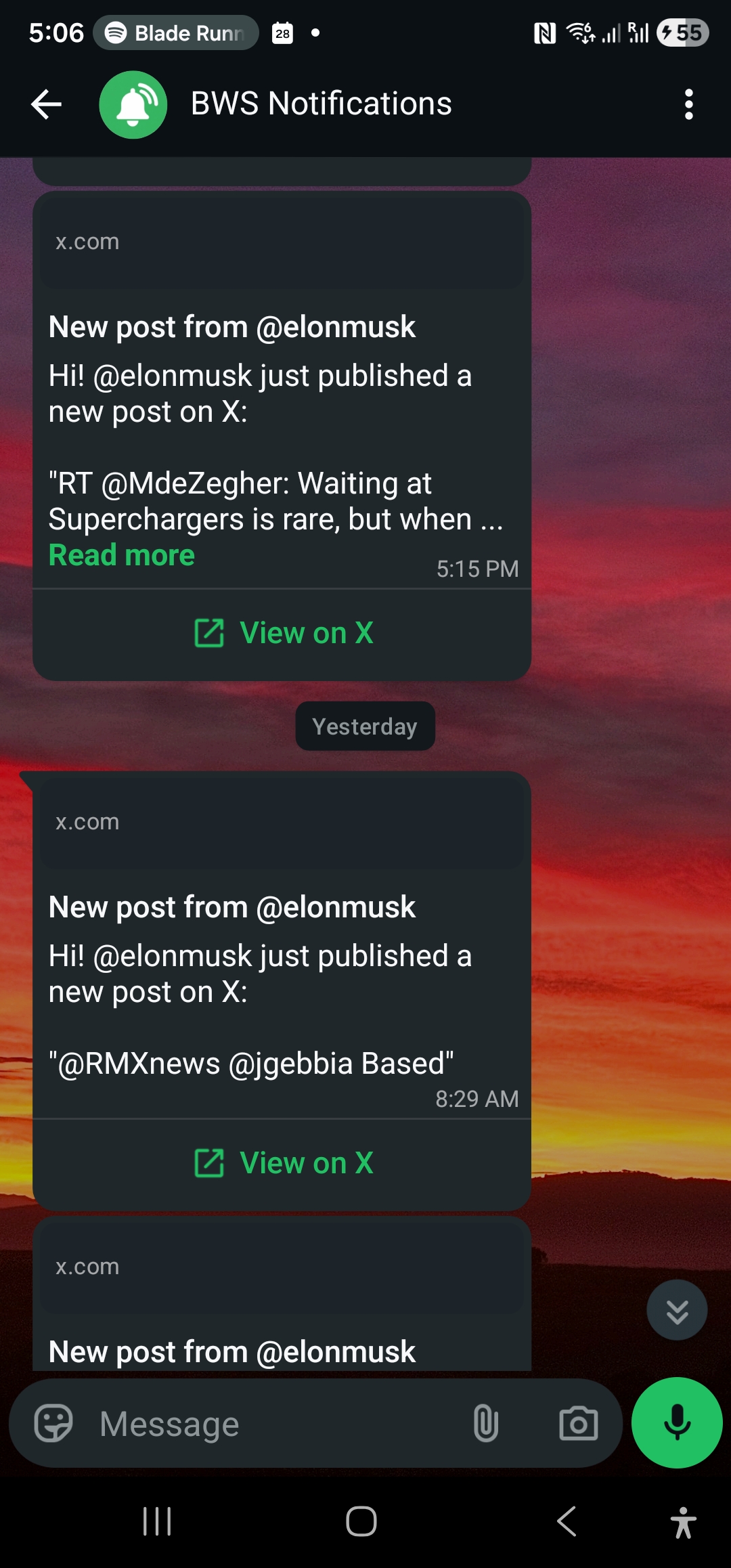
X 警報 API:以程式化方式管理 X 訂閱並將通知送至 WhatsApp
在 WALLAWHATS 之上建立自訂整合:透過 REST API 新增或移除 X 訂閱帳號、將警報路由至指定頻道,並拉取包含傳送狀態的完整通知歷史記錄。
當即時 X (Twitter) 警報成為您業務的關鍵任務時,手動控制台管理就會遇到瓶頸。無論您是在建立客戶情報控制台、自動化品牌監控工作流程,還是為交易部門建立自訂通知系統,您都需要對 X 警報訂閱進行程式化控制。
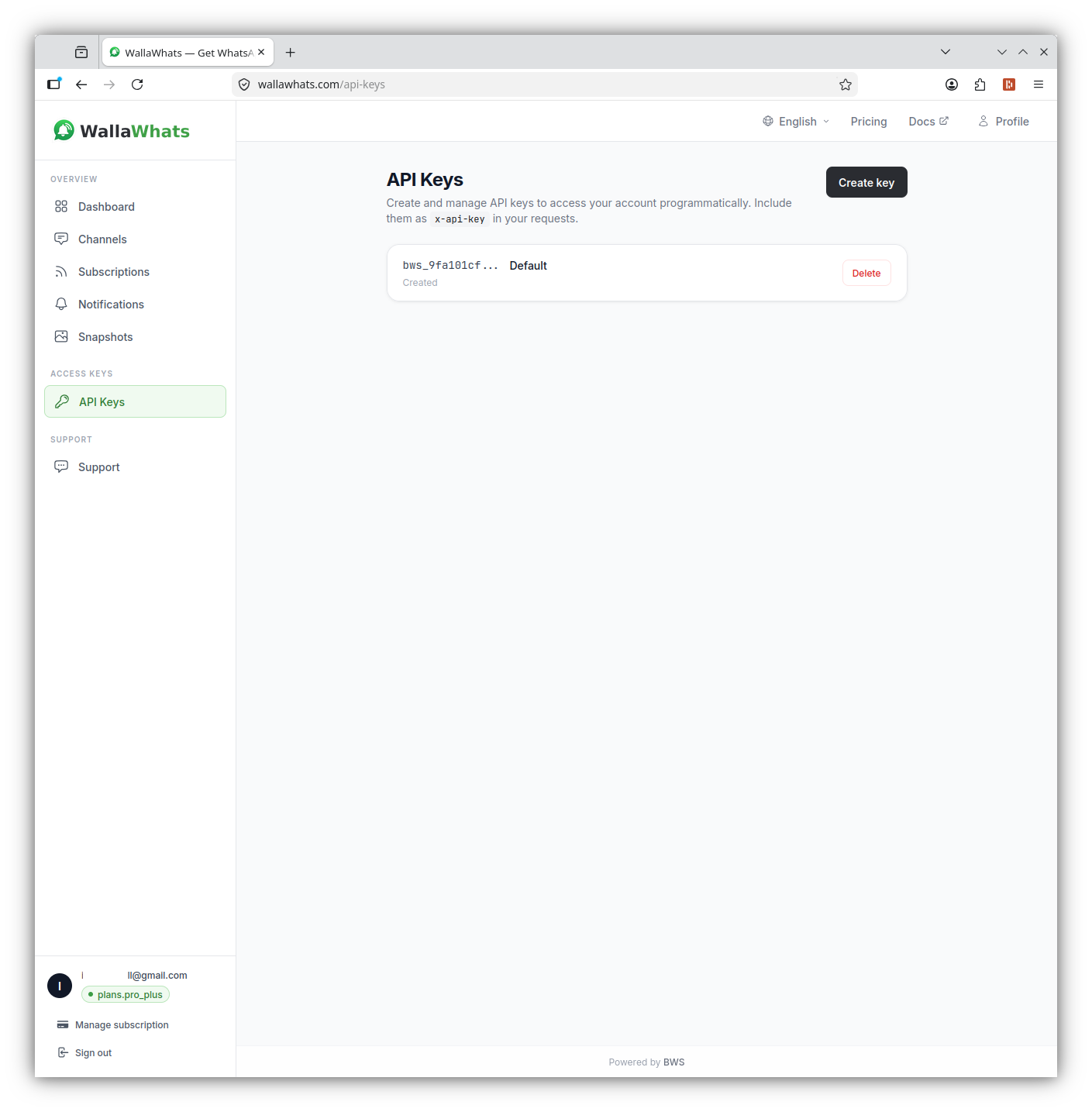
WALLAWHATS 提供 REST API,讓您無需使用網頁介面即可建立、管理和審計 X 警報訂閱。新增或移除監控帳號、拉取包含傳送狀態的通知歷史,並將即時 X 警報整合到任何支援 HTTP 的系統中。
為什麼使用 WALLAWHATS API?
控制台適用於手動工作流程,但 API 存取功能解鎖了超越人工管理範圍的自動化場景:
客戶情報平台:隨著研究工具或 CRM 整合發現新的競爭對手高管、產品負責人或行業分析師,自動訂閱他們的帳號。
交易與金融工作流程:根據投資組合變化或市場事件,程式化監控監管機關帳號、CEO 帳號或特定行業記者——無需手動訂閱管理。
大規模品牌監控:隨著新活動推出、產品發布或危機情況發展,新增或移除品牌提及追蹤。
多租戶 SaaS 應用程式:為您的客戶提供白標即時 X 監控,在幕後進行程式化訂閱管理。
合規與審計系統:拉取包含傳送狀態的完整通知歷史,用於監管報告、內部審計軌跡或 SLA 監控。
API 驗證與存取
每個 WALLAWHATS 方案都包含 API 存取功能,具有不同的金鑰配額:
- Free:1 個 API 金鑰
- Pro:1 個 API 金鑰
- Pro+:2 個 API 金鑰
- Business:5 個 API 金鑰
- Enterprise:20 個 API 金鑰
驗證使用 x-api-key 標頭(不是 Authorization: Bearer)。從控制台的 API 部分產生您的金鑰,並像對待密碼一樣對待它們——它們具有完整的帳戶權限。
curl -H "x-api-key: your_api_key_here" \
     https://api.wallawhats.com/subscriptions
核心 API 端點
WALLAWHATS API 為建立整合提供五個主要資源群組:
訂閱管理
建立新訂閱:
POST /subscriptions
Content-Type: application/json
x-api-key: your_api_key_here

{
  "xUsername": "elonmusk"
}
列出所有訂閱:
GET /subscriptions
x-api-key: your_api_key_here
移除訂閱:
DELETE /subscriptions/elonmusk
x-api-key: your_api_key_here
請注意,刪除端點使用 X 帳號作為路徑參數——不是內部訂閱 ID。
通知歷史與審計
拉取包含傳送狀態的通知歷史:
GET /notifications?from=1704067200000&to=1704153600000
x-api-key: your_api_key_here
通知端點回傳分頁結果,每一列代表傳送到一個頻道的一個警報。狀態值包括:
queued:警報已接受,等待傳送sent:已發送到頻道提供商delivered:已確認目的地接收read:收件人已開啟(僅限 WhatsApp,需要啟用讀取回條)failed:傳送嘗試失敗
頻道管理
列出已設定的頻道:
GET /channels
x-api-key: your_api_key_here
新增新頻道:
POST /channels
Content-Type: application/json
x-api-key: your_api_key_here

{
  "type": "email",
  "destination": "alerts@yourcompany.com"
}
移除頻道:
DELETE /channels/channel_id_here
x-api-key: your_api_key_here
推文快照
存取快照圖庫:
GET /snapshots
x-api-key: your_api_key_here
刪除特定快照:
DELETE /snapshots/tweet_id_here
x-api-key: your_api_key_here
新增 X 訂閱範例
透過 API 新增一個訂閱只需要一個 POST 請求,帶上要監控的 X 使用者名稱:
curl -X POST https://api.wallawhats.com/subscriptions \
  -H "x-api-key: your_api_key_here" \
  -H "Content-Type: application/json" \
  -d '{"xUsername": "openai"}'
成功時會回傳新建立的訂閱物件,包含內部訂閱 ID、X 使用者名稱與建立時間戳記。如果該帳號已經受監控,API 會將此請求視為成功(冪等處理),不會建立重複訂閱。若目標帳號為私人帳號或已停用,則會回傳 409 衝突錯誤,因為 WALLAWHATS 依設計無法監控非公開帳號。
拉取通知歷史範例
若要稽核特定時間範圍內的所有警報傳送狀態,可呼叫通知端點並帶上毫秒時間戳記:
curl -H "x-api-key: your_api_key_here" \
     "https://api.wallawhats.com/notifications?from=1719792000000&to=1719878400000"
回應會依日期範圍分頁,並附上 base64 編碼的 lastKey 游標供下一頁使用。每筆記錄代表「一則警報 × 一個頻道」的組合,因此同一則推文若同時發送到 WhatsApp 與電子郵件,會產生兩筆獨立紀錄,各自擁有自己的傳送狀態(queued、sent、delivered、read、failed)。
錯誤處理與速率限制
在生產環境中整合 API 時,常見的錯誤情境包括:
- 401 Unauthorized:API 金鑰無效或已遭撤銷。請確認標頭名稱為
x-api-key,而非Authorization: Bearer。 - 404 Not Found:嘗試刪除不存在的訂閱或頻道時觸發,通常代表該資源先前已被移除。
- 409 Conflict:嘗試訂閱私人或已停用的 X 帳號。
- 429 Too Many Requests:超出帳號方案的速度上限(依方案每小時 2 至 100 則警報不等);建議實作指數退避重試邏輯。
API 本身不會對 /subscriptions 或 /notifications 查詢額外限速,但建議在本地端快取訂閱清單,避免不必要地重複呼叫,尤其是在建構輪詢式整合時。
建立整合:程式碼範例
Node.js 整合
這是一個 Node.js 範例,新增訂閱並輪詢新通知:
const axios = require('axios');

class WallaWhatsClient {
  constructor(apiKey) {
    this.apiKey = apiKey;
    this.baseURL = 'https://api.wallawhats.com';
  }

  async addSubscription(xUsername) {
    try {
      const response = await axios.post(
        `${this.baseURL}/subscriptions`,
        { xUsername },
        { headers: { 'x-api-key': this.apiKey } }
      );
      return response.data;
    } catch (error) {
      throw new Error(`Failed to add subscription: ${error.response?.data?.message || error.message}`);
    }
  }

  async getNotifications(from, to, lastKey = null) {
    try {
      let url = `${this.baseURL}/notifications?from=${from}&to=${to}`;
      if (lastKey) url += `&lastKey=${lastKey}`;

      const response = await axios.get(url, {
        headers: { 'x-api-key': this.apiKey }
      });
      return response.data;
    } catch (error) {
      throw new Error(`Failed to fetch notifications: ${error.response?.data?.message || error.message}`);
    }
  }

  async listSubscriptions() {
    try {
      const response = await axios.get(
        `${this.baseURL}/subscriptions`,
        { headers: { 'x-api-key': this.apiKey } }
      );
      return response.data;
    } catch (error) {
      throw new Error(`Failed to list subscriptions: ${error.response?.data?.message || error.message}`);
    }
  }
}

// 使用範例
async function monitorCompetitor() {
  const client = new WallaWhatsClient('your_api_key_here');

  // 新增新訂閱
  await client.addSubscription('vercel');
  console.log('Now monitoring @vercel');

  // 檢查最近的通知
  const oneDayAgo = Date.now() - (24 * 60 * 60 * 1000);
  const notifications = await client.getNotifications(oneDayAgo, Date.now());

  console.log(`Found ${notifications.items.length} recent alerts`);
  notifications.items.forEach(notification => {
    console.log(`${notification.xUsername}: ${notification.status} at ${notification.timestamp}`);
  });
}
Python 整合
對於 Python 工作流程,這是一個處理訂閱管理和通知輪詢的類別:
import requests
import time
from datetime import datetime, timedelta

class WallaWhatsAPI:
    def __init__(self, api_key):
        self.api_key = api_key
        self.base_url = 'https://api.wallawhats.com'
        self.headers = {'x-api-key': api_key}

    def add_subscription(self, x_username):
        """新增要監控的 X 帳號"""
        response = requests.post(
            f'{self.base_url}/subscriptions',
            json={'xUsername': x_username},
            headers=self.headers
        )
        response.raise_for_status()
        return response.json()

    def remove_subscription(self, x_username):
        """從監控中移除 X 帳號"""
        response = requests.delete(
            f'{self.base_url}/subscriptions/{x_username}',
            headers=self.headers
        )
        response.raise_for_status()
        return response.status_code == 200

    def get_notifications(self, from_ms, to_ms, last_key=None):
        """取得包含分頁的通知歷史"""
        params = {'from': from_ms, 'to': to_ms}
        if last_key:
            params['lastKey'] = last_key

        response = requests.get(
            f'{self.base_url}/notifications',
            params=params,
            headers=self.headers
        )
        response.raise_for_status()
        return response.json()

    def get_all_notifications(self, from_ms, to_ms):
        """取得時間範圍內的所有通知,處理分頁"""
        all_notifications = []
        last_key = None

        while True:
            batch = self.get_notifications(from_ms, to_ms, last_key)
            all_notifications.extend(batch['items'])

            if not batch.get('lastKey'):
                break
            last_key = batch['lastKey']

        return all_notifications

    def list_subscriptions(self):
        """取得所有當前訂閱"""
        response = requests.get(
            f'{self.base_url}/subscriptions',
            headers=self.headers
        )
        response.raise_for_status()
        return response.json()

# 範例:每日審計報告
def generate_daily_report():
    api = WallaWhatsAPI('your_api_key_here')

    # 取得昨日的通知
    end_time = int(time.time() * 1000)
    start_time = end_time - (24 * 60 * 60 * 1000)

    notifications = api.get_all_notifications(start_time, end_time)

    # 按帳號和狀態分組
    report = {}
    for notification in notifications:
        account = notification['xUsername']
        status = notification['status']

        if account not in report:
            report[account] = {'total': 0, 'delivered': 0, 'failed': 0}

        report[account]['total'] += 1
        if status in ['delivered', 'read']:
            report[account]['delivered'] += 1
        elif status == 'failed':
            report[account]['failed'] += 1

    # 印出摘要
    print(f"每日警報報告 - {datetime.now().strftime('%Y-%m-%d')}")
    print("-" * 50)
    for account, stats in report.items():
        success_rate = (stats['delivered'] / stats['total']) * 100 if stats['total'] > 0 else 0
        print(f"@{account}: {stats['total']} 個警報,{success_rate:.1f}% 已傳送")
了解頻道路由
WALLAWHATS 使用全域頻道路由模型——來自每個訂閱的每個警報都會發送到所有已啟用和驗證的頻道。您無法透過 API 將特定帳號路由到特定目的地(例如「@elonmusk → WhatsApp,@vercel → 電子郵件」)。
頻道選擇在頻道頁面的帳戶層級進行。當您透過 API 新增頻道時,它在驗證後即可接收所有警報。當您移除頻道時,它會停止接收來自所有訂閱的警報。
這種設計簡化了自動化,同時防止警報分散。您的整合程式碼不需要追蹤每個訂閱的路由規則——只需管理要監控的帳號和要啟用的頻道。
速率限制與速度上限
WALLAWHATS 實施使用者層級的速度上限,以防止在高活躍期間出現警報垃圾訊息:
- Free:每小時 2 個警報
- Pro:每小時 5 個警報
- Pro+:每小時 15 個警報
- Business:每小時 30 個警報
- Enterprise:每小時 100 個警報
當超過速度上限時,額外的推文會緩衝到摘要訊息中,每 15 分鐘傳送一次。您的 API 整合會看到這些作為單獨的通知記錄——一個用於即時警報,一個用於每個摘要批次。
API 本身不會對訂閱管理或通知查詢施加單獨的速率限制。然而,避免不必要地猛烈攻擊端點——在本地快取訂閱列表,並有效地批次處理通知查詢。
錯誤處理與疑難排解
常見的 API 錯誤模式及其處理方法:
驗證失敗 (401):
- 驗證您的 API 金鑰正確且未被撤銷
- 確保您使用的是
x-api-key標頭,而不是Authorization
訂閱衝突 (409):
- 帳號已受監控:訂閱存在,視為成功
- 帳號受保護/私人:WALLAWHATS 基於設計拒絕這些
速率限制 (429):
- 在重試前指數退避
- 檢查您是否接近計畫中監控帳號的限制
頻道驗證問題:
- 新頻道在接收警報前需要 OTP 驗證
- 程式化新增的頻道在使用者完成驗證前無法運作
監控與警報您的整合
由於 WALLAWHATS 在整合到業務工作流程時成為關鍵基礎設施,請監控您的整合健康狀況:
訂閱偏移檢測:
// 檢查預期的訂閱是否仍然活躍
async function auditSubscriptions(expectedHandles) {
  const current = await client.listSubscriptions();
  const currentHandles = current.map(s => s.xUsername);

  const missing = expectedHandles.filter(h => !currentHandles.includes(h));
  if (missing.length > 0) {
    console.warn(`Missing subscriptions: ${missing.join(', ')}`);
  }

  return missing;
}
傳送成功率監控:
def check_delivery_health():
    # 檢查最近 6 小時
    end_time = int(time.time() * 1000)
    start_time = end_time - (6 * 60 * 60 * 1000)

    notifications = api.get_all_notifications(start_time, end_time)
    if not notifications:
        return None

    delivered = sum(1 for n in notifications if n['status'] in ['delivered', 'read'])
    total = len(notifications)
    success_rate = (delivered / total) * 100

    if success_rate < 95:
        # 警告您的運維團隊
        print(f"警告:傳送成功率降至 {success_rate:.1f}%")

    return success_rate
整合模式與最佳實務
Webhook 風格處理:雖然 WALLAWHATS 不直接提供 webhook,但您可以輪詢通知端點來取得新警報並進行近乎即時的處理:
async function pollForNewAlerts() {
  const lastCheck = localStorage.getItem('lastNotificationCheck') || Date.now() - 300000;
  const now = Date.now();

  const notifications = await client.getNotifications(lastCheck, now);

  for (const notification of notifications.items) {
    if (notification.status === 'delivered') {
      // 處理警報 - 發送到 Slack、更新資料庫等
      await processAlert(notification);
    }
  }

  localStorage.setItem('lastNotificationCheck', now);
}

// 每 30 秒輪詢一次
setInterval(pollForNewAlerts, 30000);條件式訂閱管理:根據外部觸發器動態新增或移除訂閱:
def update_competitor_monitoring(portfolio_companies):
    """根據當前投資組合更新 X 監控"""
    current_subs = {s['xUsername'] for s in api.list_subscriptions()}

    # 我們應該監控的帳號
    target_accounts = set()
    for company in portfolio_companies:
        if company.get('ceo_twitter_handle'):
            target_accounts.add(company['ceo_twitter_handle'])
        if company.get('company_twitter_handle'):
            target_accounts.add(company['company_twitter_handle'])

    # 新增遺漏的訂閱
    for account in target_accounts - current_subs:
        try:
            api.add_subscription(account)
            print(f"開始監控 @{account}")
        except Exception as e:
            print(f"新增 @{account} 失敗:{e}")

    # 移除過時的訂閱
    for account in current_subs - target_accounts:
        api.remove_subscription(account)
        print(f"停止監控 @{account}")
WALLAWHATS API 將即時 X 警報從手動控制台工具轉變為可程式化的基礎設施元件。無論您是建立自訂情報工作流程、自動化品牌監控,還是建立白標通知服務,API 都提供了生產整合所需的控制和審計功能。
想要將監控擴展到競爭對手之外?請查看我們關於監控加密貨幣 Twitter 以獲取市場信號的指南,或了解記者如何使用 WALLAWHATS 進行即時來源監控。
再也不會錯過重要的貼文。建立免費帳戶——1 個 WhatsApp 號碼、即時警報,無需信用卡。

關於作者
Nacho Coll
Founder & Engineer at WallaWhats
Nacho founded WallaWhats so you get the alerts that matter without depending on X's algorithm to surface them — pick the accounts you care about and get a WhatsApp for every post the moment it goes live, in order, nothing throttled or buried. Writes about real-time notification systems, social-signal monitoring, and serverless delivery pipelines from the operator side of the wire.