WhatsApp Alerts for Crypto Twitter: Catch Posts Fast
Get instant WhatsApp alerts for crypto Twitter accounts. Catch market-moving posts in seconds — no app-switching, no missed signals.
 by Nacho Coll
Nacho founded WallaWhats so you get the alerts that matter without depending on X's algorithm to surface them — pick the accounts you care about and get a WhatsApp for every post the moment it goes live, in order, nothing throttled or buried.
For crypto traders, Twitter is where the market moves first. A founder hints at a token migration, an exchange announces a listing, an analyst flags a structural divergence — and prices react before most people have refreshed their feed. The trader who saw it ten seconds earlier had ten seconds of free option value.
But there’s a problem with using Twitter as a real-time signal layer: the algorithmic feed isn’t built for urgency. Posts get reordered for engagement. A single influential founder can post and have it buried beneath a viral meme. By the time you scroll to it, the move is already in.
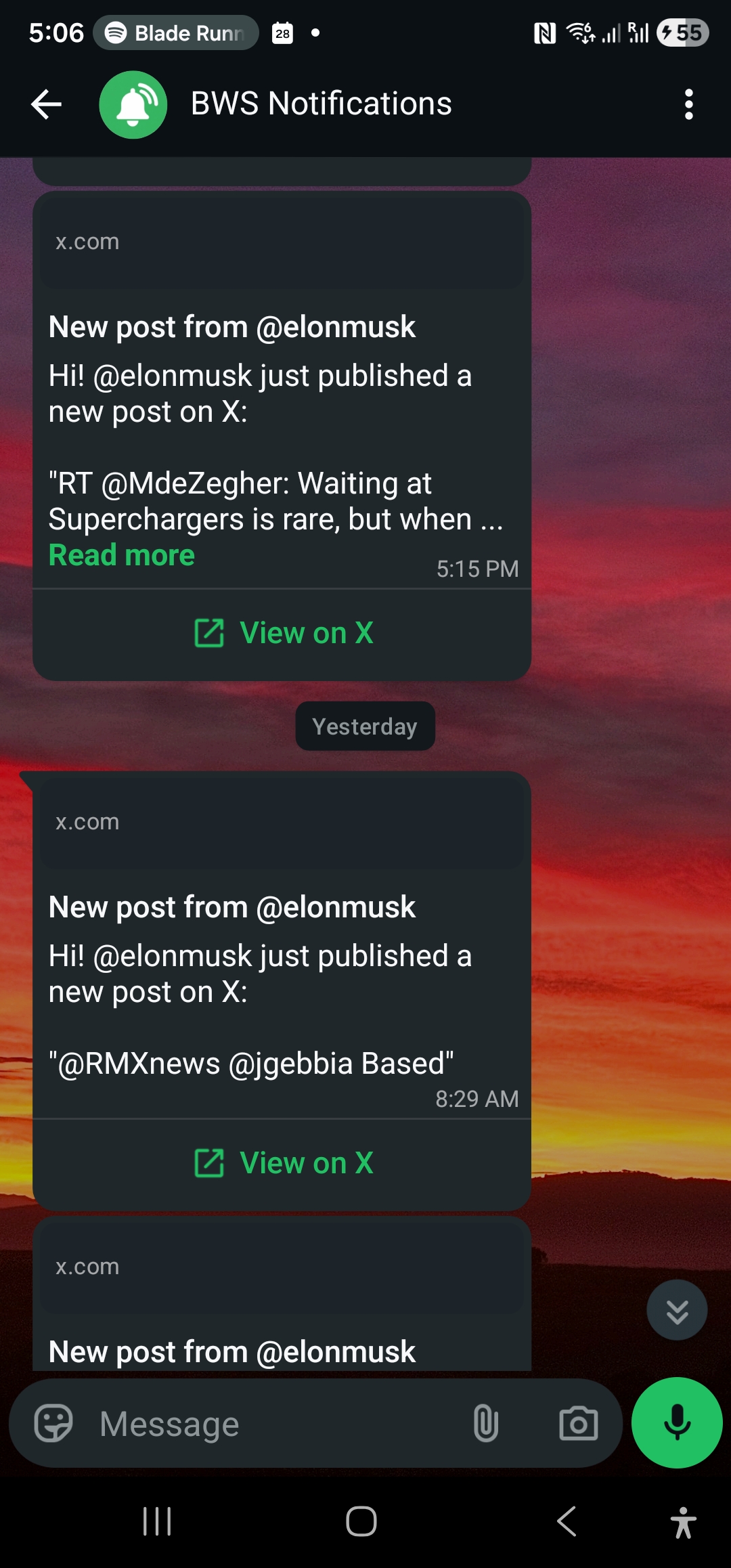
What if the posts you actually trade on were delivered the instant they went live — to WhatsApp, the app you already check throughout the day? That’s what WallaWhats does: you pick the X accounts that matter, and we send a WhatsApp alert seconds after a new post hits.
Why WhatsApp beats every other channel for crypto signals
The competing options each have a fatal flaw for trading:
- Email digests (Twilert, Warble) — batched daily or hourly. Useless for a market that moves in seconds.
- Push notifications from the X app — buried under everything else your phone is doing, and X has been throttling them for non-engaged accounts.
- Discord / Telegram bots — fast, but you have to be actively in the channel. Most traders don’t sit in 12 Telegrams at once.
- TradingView/exchange alerts — fire on price moves, not on the cause of the move. By the time the price moves, you’re a follower not a leader.
WhatsApp wins because it’s a lock-screen channel that’s already in your habit loop. You’re checking it for personal messages anyway. A crypto alert lands the same way — top of the screen, audible, indistinguishable from a friend texting you. Open rate is functionally 100%.
The accounts you actually want monitored
Crypto Twitter is huge, but the signal-to-noise ratio collapses fast. The traders who use real-time monitoring well limit themselves to a small Tier 1 list — typically 10-30 accounts whose posts genuinely move markets. Some categories:
Protocol founders and core devs. When the founder of a protocol posts about an exploit, an upgrade, or a partnership, prices move. These are the highest-conviction signals.
Exchange announcements. Listing announcements from Binance, Coinbase, Upbit, etc. produce instant 20-50% moves on the listed asset. Even rumors of a listing — leaked screenshots, careless tweets — get arbitraged in seconds.
On-chain analysts. Accounts like @lookonchain, @arkham, @nansen_ai post when whale wallets move, when stablecoins de-peg, or when bridges show unusual flow. These are pre-price-move signals.
Macro voices. A handful of macro analysts (think people regularly cited by @WatcherGuru) frame the broader risk-on/risk-off posture. Knowing they’ve posted a thread is useful even if you haven’t read it yet.
The handful of consistently-right traders. Every cycle there are a few accounts whose calls are worth watching in real time, and that list shifts each cycle. WallaWhats lets you swap accounts in and out of monitoring without rebuilding any setup.
You don’t want notifications for everything Crypto Twitter posts. You want them for the ~20 accounts that matter to your strategy. If you’re building out a dedicated list of wallets, exchanges, and protocol accounts to follow, see Track Crypto Accounts on X for a deeper walkthrough of picking and organizing that list.
How a typical trader sets this up
The sane setup is two tiers of WhatsApp alerts:
- Real-time, individual posts — for your top 10-15 accounts. Each new post triggers a WhatsApp message immediately. This is the signal layer for active trading.
- Hourly digest — for a wider list of 30-50 accounts you want to keep tabs on but don’t need every post in real time. WallaWhats batches their posts into an hourly summary so you stay informed without notification fatigue.
This is exactly the configuration WallaWhats supports. Set the delivery mode per account: instant for tier 1, digest for tier 2. You get the lock-screen interrupt for the posts that matter and a tidy hourly briefing for everything else.
Latency, in concrete numbers
Trading-grade alerts live or die on latency. Here’s WallaWhats’s end-to-end timeline for a tier-1 instant alert:
X post published                   t = 0s
X delivers via filtered stream     t = ~5s   (X's own API latency)
WallaWhats fan-out + send          t = +1-2s
WhatsApp arrives on your phone     t = +0.5s
─────────────────────────────────────────
Total                              ~6-8s
You’re getting a WhatsApp message 6-8 seconds after the post went live on X. For comparison, X’s own push notifications average 30-90 seconds in our measurements (and frequently fail to fire entirely on accounts you don’t actively engage with).
Real example: catching an exchange listing
In April 2025 a major US exchange tweeted a short listing announcement at 14:32 UTC. The token in question went from $0.43 to $0.61 in the next 90 seconds — a ~42% move on the announcement alone, before exchanges had even enabled trading.
A trader using WallaWhats with that exchange’s account on instant-alert would have received the WhatsApp message at ~14:32:08. That’s ~1 minute and 22 seconds of headroom to react before the bulk of the move hit. Plenty of time to place a market order on a venue where the asset was already listed.
Without WallaWhats? The trader either had the X app open with notifications enabled (and was paying attention — most aren’t constantly), or saw the move on price first, by which point the alpha was already gone.
Common questions from traders
Can WallaWhats handle a tweet storm? Yes. If 5 of your monitored accounts post in the same minute, you’ll get 5 separate WhatsApp messages — no batching, no missed posts. The rate limit is per WhatsApp Business API, not per account.
Is there a way to filter for keywords within an account’s posts? Not yet — current scope is account-level monitoring. If a tracked account posts something irrelevant to crypto, you still get notified. In practice, traders curate their tracked list to keep the noise low.
What about retweets and replies? WallaWhats sends alerts only for original posts (not retweets, not replies to others). This keeps the signal clean — you’re alerted when the account originates content, not when they engage with someone else’s.
Does it work with Twitter circles or protected accounts? No. WallaWhats only sees public posts. If an account is private, X’s API won’t expose its tweets to anyone outside the follower graph, including WallaWhats.
Pricing for traders
The free tier monitors 2 accounts and gives you 3 alerts/month — enough to test the latency and verify the workflow on your own setup. The Pro tier ($5/mo) covers 3 accounts and 50 alerts/month, which is suitable for narrow casework. Most active traders run on Pro+ ($12/mo, 10 accounts, 250 alerts) or Business ($29/mo, 20 accounts, 1,000 alerts).
For traders managing portfolios across multiple sectors (DeFi + L1s + memecoins, for example), the Business tier’s 20 accounts is usually the sweet spot. The Enterprise tier ($99/mo, 50 accounts) is for newsrooms, fund analysts, and prop desks that need broad coverage.
Setup is 30 seconds
You sign up with email or Google, paste the X handles you want monitored, verify your WhatsApp number with a one-time code, and you’re done. No browser extension, no app to install, no API keys to manage. The next time one of your tracked accounts posts, you get a WhatsApp message. For more on how that passwordless, code-based verification works, see passwordless WhatsApp sign-in explained.
If your day involves trading, founder-watching, or any market where Twitter is the leading indicator — WallaWhats is the signal layer that pays for itself the first time you catch a tweet you would have missed.
About the author
Nacho Coll
Founder & Engineer at WallaWhats
Nacho founded WallaWhats so you get the alerts that matter without depending on X's algorithm to surface them — pick the accounts you care about and get a WhatsApp for every post the moment it goes live, in order, nothing throttled or buried. Writes about real-time notification systems, social-signal monitoring, and serverless delivery pipelines from the operator side of the wire.