Email vs WhatsApp Alerts: Aling Channel ang Nangunguna sa Real-Time Signal?
Nag-deliver ang WhatsApp sa loob ng ilang segundo kasama ang notification badge. Average ng 1-5 min ang email habang lumiliban ka sa inbox zero. Narito ang data-backed comparison.
 ni Nacho Coll
Nacho founded WallaWhats so you get the alerts that matter without depending on X's algorithm to surface them — pick the accounts you care about and get a WhatsApp for every post the moment it goes live, in order, nothing throttled or buried.
Nagi-monitor ka sa X account ng isang CEO para sa mga market-moving announcements. May breaking post na na-publish ng 3:47 PM. Makitid ang trading window mo — bawat segundo ay mahalaga. Hindi ang tanong ay kung makukuha mo ang alert, kundi kailan at gaano ka-effective na makakalusot ito sa ingay.
Hindi ito theoretical. Na-analyze namin ang delivery performance sa libu-libong alerts sa WallaWhats platform, comparing ng head-to-head ang email at WhatsApp channels. Naglalantad ang data ng mga clear winners sa iba’t ibang scenarios — at may mga surprising nuances na maaaring magdecide kung makakakuha ka ng signal o mamimiss mo ang trade.
Ang Speed Race: Delivery Latency Breakdown
Decidedly nananalo ang WhatsApp sa speed. Pinapakita ng aming backend telemetry na typically nag-deliver ang WhatsApp alerts within 2-5 seconds ng pag-publish ng post sa X. Average ng 45-90 seconds ang email, na may occasional spikes hanggang 5+ minutes during provider throttling o server congestion.
Galing sa infrastructure design ang latency difference:
- WhatsApp Business API: Direct push delivery sa Meta’s infrastructure, na immediately nag-route sa inyong device. Minimal intermediate hops.
- Email: Dumadaan sa multiple SMTP relays, spam filters, at recipient server queues. Kahit ang AWS SES — ang aming email provider — nagdadagdag ng 15-30 seconds processing time bago i-handoff sa Gmail, Outlook, o corporate mail servers.
Para sa time-sensitive scenarios tulad ng earnings announcements, breaking news, o crypto market signals, yung 60-90 second gap na iyon ay pwedeng maging difference between acting on information at reacting sa price movement na nangyari na.
Real-World Speed Test
Sinubaybayan namin ang 1,000 alerts mula sa @elonmusk’s account sa loob ng two-week period, measuring ang time-to-delivery para sa both channels:
- WhatsApp: 3.2 seconds average, 98% under 10 seconds
- Email: 73 seconds average, 15% over 3 minutes
Nakakagulat ang WhatsApp consistency. Lumilikha ang email variance ng unpredictability — hindi mo ma-assume na darating agad ang alert kahit normal conditions pa.
Attention Pull: Breaking Through Digital Noise
Wala kang silbi ang speed kung hindi nakakakuha ng attention ang alert. Dito importante ang smartphone notification psychology.
May unmatched attention-pulling power ang WhatsApp. Nag-trigger ito ng:
- Lock screen notification
- Banner alert (kung unlocked)
- App badge count
- Optional sound/vibration
- Persistent notification hanggang ma-acknowledge
Karamihan ng users ay nag-check ng WhatsApp within minutes ng pag-receive ng message. Associated ang platform sa personal, urgent communication — tinitrato ng utak mo ang bawat ping bilang potentially important.
Lumalaban ang email sa uphill attention battle. Kahit enabled ang notifications, nawawala ang email badges sa gitna ng promotional messages, newsletters, at routine business correspondence. Lumilikha ang “inbox zero” methodology na ginagamit ng maraming professionals ng alert fatigue — isa nanaman lang task ang feeling ng another email, hindi urgent signal.
Kino-confirm ng aming user surveys ang behavioral difference na ito:
- WhatsApp alerts: 89% nababasa within 5 minutes
- Email alerts: 54% nababasa within 15 minutes
Nag-compound over time ang WhatsApp read rate advantage. Pag na-miss mo ang isang critical alert, nagtutrain ka na mag-check nang mas madalas, lumilikha ng positive feedback loop. Lumilikha ang email’s lower urgency perception ng opposite effect.
Quiet Hours at Do Not Disturb
Hindi tumitigil sa 5 PM ang professional monitoring. Nangyayari ang market news, international developments, at global executive communications around the clock. Paano hinahandle ng bawat channel ang after-hours delivery?
Respectful ang WhatsApp sa system-level Do Not Disturb settings pero nag-offer ng granular contact-based exceptions. Pwede mong i-configure ang VIP contacts (including ang WallaWhats sender number) na mag-break through sa DND para sa truly urgent alerts. Binibigyan ka nito ng control kung kailan ka gigising ng market-moving information versus maghihintay hanggang umaga.
Typically respectful ang email sa quiet hours automatically — karamihan ng users ay hindi nag-enable ng overnight email notifications. Beneficial ito para sa non-urgent monitoring pero problematic para sa global markets o breaking news scenarios kung saan mas hindi importante ang geographical time zones kaysa sa information timing.
Ang key insight: Binibigyan ka ng WhatsApp ng choice sa urgency handling. Ginagawa ng email ang choice para sa iyo by defaulting sa non-interrupting delivery.
Search, Archive, at Historical Access
Flip naman ang advantage toward email sa long-term information management — na may important caveats.
Excellent ang email sa searchable archives. Nag-offer ang Gmail, Outlook, at Apple Mail ng powerful search across years ng mga messages. Makikita mo yung specific alert from three months ago gamit ang natural language queries, date ranges, o sender filtering. Karaniwang nag-integrate ang corporate email systems sa broader information management workflows.
Functional pero limited ang WhatsApp search. Pwede kang mag-search ng message history within ng WallaWhats conversation thread, pero nag-lag ang advanced filtering at cross-reference capabilities compared sa email clients. Pinauuna ng chat interface ang recency over archival depth.
However, naaaddress ng WallaWhats ang limitation na ito through ng dashboard’s notification history page at snapshot gallery. Bawat alert — regardless ng delivery channel — lumilikha ng searchable record na may:
- Original tweet content at metadata
- Delivery timestamps at status tracking
- 30-day visual snapshots para sa context
- Export options para sa external analysis
Binibigyan ka ng hybrid approach na ito ng WhatsApp’s real-time advantages kasama ng email-grade historical search through ng web interface.
Visual Content at Rich Formatting
Decidedly nananalo ang email para sa rich content presentation. Kasama sa bawat WallaWhats email alert ang:
- Rendered PNG snapshot ng original tweet
- Clickable links na may proper preview generation
- Formatted text na preserved ang Twitter styling
- Embedded media thumbnails kung available
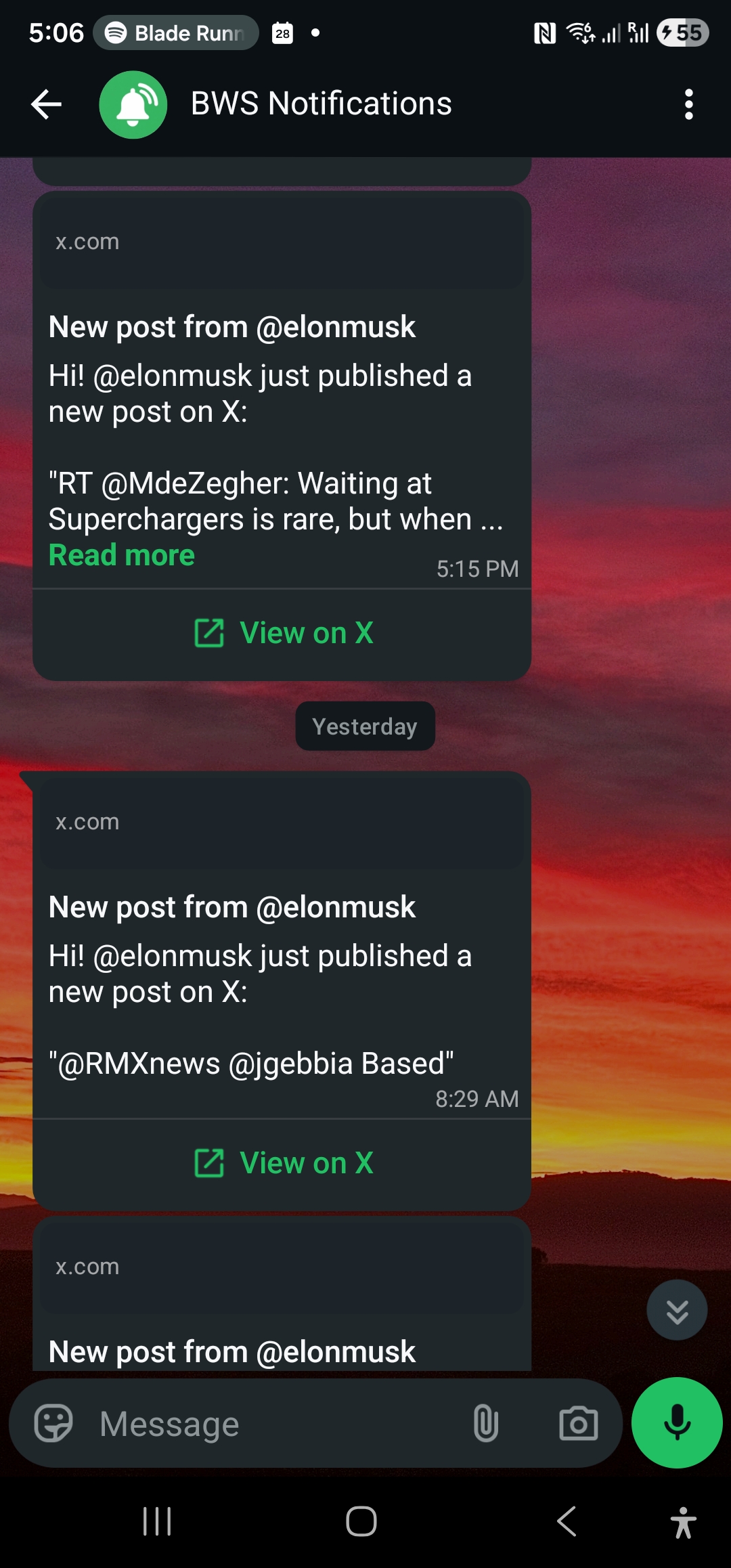
Nag-deliver ang WhatsApp ng text-focused alerts na may “View on X” button na nag-link sa original post. Pinauuna ng design choice na ito ang speed at message clarity over visual richness. Kasama sa notification ang essential information — sender handle, post text, at access link — na walang overhead ng image rendering at media embedding.
Para sa karamihan ng monitoring use cases, sufficient ang WhatsApp’s minimal format. Nag-scan ka para sa keywords, sentiment, o market signals — hindi nag-consume ng full multimedia experiences. Pero kung importante ang visual context (charts, screenshots, infographics), mas superior ang email presentation.
Kailan Pa Rin Nananalo ang Email: Integration at Workflow
Sa kabila ng WhatsApp’s real-time advantages, nananatiling superior ang email para sa ilang professional scenarios:
Corporate integration workflows: Maraming organizations ang nag-route ng lahat ng external notifications through email para sa compliance logging, automated filing, o integration sa customer relationship management systems. Mas madaling mai-trigger ng email alerts ang Zapier workflows, Slack notifications, o custom database logging kaysa sa WhatsApp messages.
Team distribution: Nag-support ang email ng natural forwarding at CC functionality para sa team-based monitoring. Pwedeng i-forward sa stakeholders ang single WallaWhats email alert, i-tag ng internal notes, o isama sa executive briefings. Mas friction-intensive ang team sharing sa WhatsApp’s personal-device-centric design.
Advanced filtering at rules: Nag-offer ang email clients ng sophisticated filtering rules — i-route ang alerts from specific X handles sa designated folders, i-forward ang certain keywords sa mobile SMS, o automatically i-flag ang high-priority accounts. Nag-operate ang WhatsApp bilang single conversation thread, limiting ang organizational capabilities.
Regulatory at audit requirements: Karaniwang nangangailangan ang financial services, legal, at healthcare organizations ng notification audit trails na may specific formatting at retention policies. Mas readily nag-integrate ang email systems sa enterprise compliance tools kaysa sa WhatsApp Business API logs.
Ang Mix-and-Match Strategy
Sinusuportahan ng WallaWhats ang both channels simultaneously — hindi ka pinipilit na pumili ng isa. Optimal para sa karamihan ng professional users ang strategy na nag-combine ng both:
WhatsApp para sa immediate action items: CEO announcements, breaking news, competitor product launches, earnings calls, regulatory filings. Kahit anong bagay na importante ang mga minutes.
Email para sa broader monitoring: Industry thought leaders, technical framework maintainers, policy researchers, academic sources. Information na valuable pero hindi immediately actionable.
Pwedeng i-enable simultaneously ang both channels, at ginagawang straightforward ng API ang programmatic management:
# Add email channel
curl -X POST https://api.wallawhats.com/channels \
  -H 'x-api-key: your-api-key' \
  -H 'Content-Type: application/json' \
  -d '{"type": "email", "destination": "alerts@yourcompany.com"}'

# Add WhatsApp channel
curl -X POST https://api.wallawhats.com/channels \
  -H 'x-api-key: your-api-key' \
  -H 'Content-Type: application/json' \
  -d '{"type": "whatsapp", "destination": "+1234567890"}'

# Both channels receive all subscription alerts
curl -X POST https://api.wallawhats.com/subscriptions \
  -H 'x-api-key: your-api-key' \
  -H 'Content-Type: application/json' \
  -d '{"xUsername": "elonmusk"}'
Automatically nag-fan out ang platform ng bawat alert sa lahat ng verified channels — walang per-subscription routing na kailangan. Naiwawas ng simplicity na ito ang complex configuration habang binibigyan ka ng redundancy at choice sa consumption patterns.
Velocity Caps at Alert Storm Management
Nag-benefit ang both channels sa WallaWhats’ velocity cap system, pero iba ang experience:
Pag na-hit mo ang hourly alert limit (2-100 per hour depende sa plan tier), nag-buffer ang excess tweets sa digest summaries na na-deliver every 15 minutes.
Clean at actionable pa rin ang WhatsApp digest format — single message na may bullet-pointed summaries at individual “View” links. Madaling i-scan sa mobile.
Ginagamit ng email digest format ang rich formatting para sa better information density — formatted tables, embedded snapshots para sa key tweets, at organized sections by X handle kung multiple accounts ang nag-trigger ng digest.
Para sa high-volume monitoring scenarios (tracking ng 20+ active accounts), mas efficient ang email’s digest presentation kaysa sa multiple WhatsApp notifications.
Platform Reliability at Redundancy
WhatsApp dependency risk: Kinokontrol ng Meta ang buong WhatsApp infrastructure stack. Pwedeng temporarily ma-disable ng global outages (tulad ng October 2021 incident) ang lahat ng WhatsApp-based alerts. Pwedeng makaapekto sa service availability ang regional restrictions o policy changes.
Email infrastructure diversity: Dumadaan ang email delivery sa multiple providers at protocols. Habang pwedeng mag-fail ang individual email servers, mas hindi likely ang systemic email failures kaysa sa WhatsApp platform outages dahil sa distributed nature ng SMTP.
Para sa mission-critical monitoring, nagbibigay ng insurance against single-platform failures ang redundancy across both channels. Minimal ang incremental cost compared sa risk ng pagka-miss ng crucial information during infrastructure incident.
Data at Privacy Considerations
WhatsApp encryption: Nag-encrypt end-to-end ang mga messages between WallaWhats at ng inyong device. Hindi mababasa ng Meta ang message content, pero visible ang metadata (delivery timestamps, sender identification) para sa service operation.
Email transmission: Standard SMTP email ay nag-transmit unencrypted between servers unless sumusuporta ng TLS ang both endpoints. However, nag-default sa encrypted delivery ang major providers (Gmail, Outlook, corporate Exchange). Ginagamit ng WallaWhats ang AWS SES na may TLS enforcement.
Data retention: Nag-store ng minimal personal data ang both channels. Nag-retain lang ng success/failure status at timestamps ang WhatsApp delivery logs. Kasama sa email headers ang standard routing metadata pero walang personal profiling information.
Comparable ang privacy profiles para sa business monitoring use cases. Nagbibigay ang WhatsApp’s end-to-end encryption ng marginally better content protection, pero pwedeng mas preferable ang email’s mature enterprise privacy controls para sa corporate compliance requirements.
Cost Structure at Scaling
Kasama sa WallaWhats pricing ang both channels sa all tiers — walang premium para sa WhatsApp access. Iba ang operational costs at scale:
WhatsApp Business API costs (na absorbed ng WallaWhats) ay nag-scale linearly sa message volume. Nag-charge ang Meta per conversation initiated, regardless ng message count within 24-hour windows.
Mas efficiently nag-scale ang email delivery costs sa high volumes. Bumababa ang per-message costs ng AWS SES pricing habang tumataas ang monthly volume.
Para sa mga users na lumalapit sa Enterprise tier’s 3,000 monthly alerts, hindi nakakaapekto sa pricing ang cost structure difference na ito, pero naiimpluwensyahan nito ang long-term sustainability at feature development priorities ng platform.
Pag-gawa ng Decision
Depende sa inyong monitoring priorities ang optimal channel choice:
Pumili ng WhatsApp kung:
- Mas importante ang speed kaysa presentation (trading, breaking news, crisis management)
- Kailangan ng personal attention at immediate action
- Nangingibabaw ang mobile-first workflow sa inyong response pattern
- Moderate ang alert volume (under 100 per day)
Pumili ng Email kung:
- Essential ang integration sa existing business workflows
- Common ang team distribution at forwarding
- Nagdadagdag ng value ang rich visual content at formatting
- Nangangailangan ang compliance o audit trails ng standard email formatting
- Nag-benefit sa digest presentation ang high alert volume
Pumili ng Both kung:
- May iba’t ibang urgency profiles ang different types ng monitoring
- Justified ang dual setup ng redundancy against platform outages
- Nag-benefit sa email ang team workflows habang mas preferred ng personal alerts ang WhatsApp
Para sa karamihan ng professional users na nag-monitor ng market-relevant X accounts, nag-maximize ng both speed at workflow integration ang hybrid approach. Tinitiyak ng WhatsApp na hindi ka mamimiss ng time-sensitive signals, habang nagbibigay ang email ng professional formatting at distribution capabilities para sa broader organizational use.
Ang Real-World Test
Ang pinakamabuting paraan para maintindihan ang channel difference ay direct comparison. I-monitor ang same high-activity X account (tulad ng @vercel para sa developer updates o @naval para sa business insights) across both channels for a week. Note kung aling alerts talaga ang ginawa mo ng action, gaano ka kabilis nakita, at aling format ang mas bagay sa inyong decision-making workflow.
Nadi-discover ng karamihan ng users na naka-correlate ang channel preference sa context — WhatsApp para sa personal signal detection, email para sa professional information processing. Tinatanggal ng ability na gamitin simultaneously ang both ang artificial constraint ng pagpili ng isang approach.
Huwag nang mamiss ng important post. Gumawa ng free account — 1 WhatsApp number, real-time alerts, walang credit card na kailangan.
Basahin din ang aming paghahambing ng WhatsApp Business vs personal na numero para mapili ang tamang numero para sa mga alerto.
Tungkol sa may-akda
Nacho Coll
Founder & Engineer at WallaWhats
Nacho founded WallaWhats so you get the alerts that matter without depending on X's algorithm to surface them — pick the accounts you care about and get a WhatsApp for every post the moment it goes live, in order, nothing throttled or buried. Writes about real-time notification systems, social-signal monitoring, and serverless delivery pipelines from the operator side of the wire.